SIM-based Connection Guide
EAP-SIM set-up guides based on your device's operating system
IMPORTANT
: Click
here
to check if your device supports EAP-SIM, then configure your devices by following these instructions.
|
Operating System: iOS 5.x and above
|
Step 1
:
Launch Safari browser on your iPhone or iPad, then tap on the icon to download iOS config file.
|

|
Step 2
:
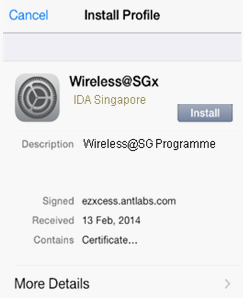
Click install. Wireless @SGx profile will be installed onto iOS device.
|
|
Step 3
:
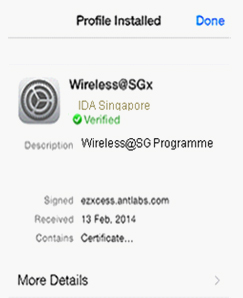
Once Wireless@SGx profile has been successfully verified, iOS device will automatically connect to Wireless@SGx SSID.
|
|
|
Click here to view video guide
.
|
|
Operating System: Android 4.x and above
|
|
Step 1
:
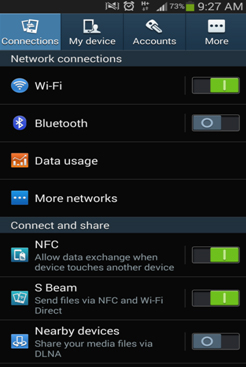
Select Wi-Fi from settings menu.
|
|
|
Step 2
:
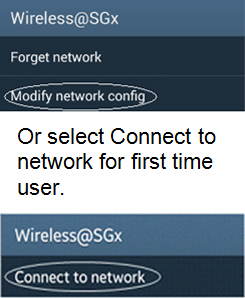
Press and hold the "Wireless@SGx SSID", then select Modify network config.
|
|
|
Step 3
:
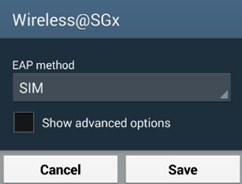
Select SIM from EAP method drop down menu and click save.
|
|
|
Click here to view video guide
.
|
|
Note: Local Samsung devices that are running Android 4.4.2 will be able to connect to Wireless@SGx automatically without going through the setup process.
|
|
Operating System: BlackBerry OS 10 and above
|
|
Step 1
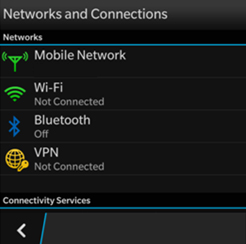
: Select Wi-Fi from settings menu.
|
|
|
Step 2
:
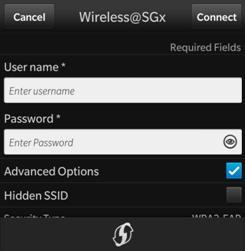
Press and hold the "Wireless@SGx SSID", then check "Advanced Options". (Leave user name and password blank)
|
|
|
Step 3
:
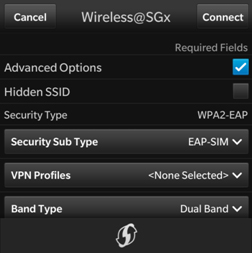
Select EAP-SIM under Security Sub Type and click connect.
|
|
|
Click here to view video guide
.
|
|
Operating System: Windows Phone
|
|
Windows Phone will support EAP-SIM for Wireless@SGx profile in an upcoming update.
|
Here is the list of supported devices as of 28 March 2014.
|
Manufacturer
|
Device Model
|
Operating System
|
|
Apple
|
-
iPhone 4/4s
-
iPhone 5/5s/5c
-
iPad
|
iOS
|
|
Asus
|
-
Padfone Infinity A86
-
Fonepad/ Fonepad 7
|
Android
|
|
Blackberry
|
-
Z10
-
Z30
-
Q5
-
Q10
-
Bold 9900
-
9220
-
9320
-
9360
-
9790
-
9860
|
Blackberry
|
|
LG
|
-
Optimus F5 (P875)
-
Otpimus L3/L5/L7
-
G Flex D958
-
G2
|
Android
|
|
HTC
|
-
HTC One
-
HTC One Mini
-
HTC DLX+
-
HTC Desire 300/601
|
Android
|
|
Motorola
|
-
Moto G Black
-
Droid Razr
-
Atrix-2
|
Android
|
|
Samsung
|
-
Note LTE
-
Note 2/ 2 LTE
-
Note 3/ 3 LTE
-
Galaxy Express
-
Galaxy 3/3 LTE
-
Galaxy 3 mini
-
Galaxy 4/4 LTE
-
Galaxy Mega
|
Android
|
|
Sony
|
-
Xperia C
-
Xperia V
-
Xperia acro S
-
Xperia ion
-
Xperia J
-
Xperia Z
-
Xperia Z Ultra
-
Xperia Z1
-
Xperia SP
-
Xperia L
-
Xperia Tablet Z
|
Android
|
*If your device is not listed here, please refer to the
Non SIM-based Connection Guide
.
Complete
Need further help?
M1 subscribers:
Contact the M1 customer support helpdesk:
Tel: 6796-0362
Operating hours: 9.00am - 9.00pm (Monday-Sunday)
Email:
[email protected]
SingTel subscribers:
Contact the customer support helpdesk:
Tel: 1688
Operating hours: 8.00am - 6.00pm (Monday-Saturday)
Email:
info.singtel.com/Contact-Us
StarHub subscribers:
Contact the StarHub customer support helpdesk:
Tel: 6873 2828
Operating hours: 8.00am - 12.00am (Monday - Sunday)
Email:
[email protected]
Y5Zone subscribers:
Contact the Y5Zone customer support helpdesk:
Tel: 6491 9652
Operating hours: 8.00am - 8.00pm (Monday - Friday)
Email:
[email protected]